Friday, July 25, 2008

Customizing Forms in HRMS-Part1(Custom Form)

Hi All,
Quite often we get the requirements for restricting access and fuctionalites in form which is normally done either by formspersonalization or custom.pll or standard form modification
In HRMS quite often i have seen the restrictions like create applicant ,create placment ,create employement functionalities to certain responsibilities...For these forms there is no need to do forms personalization ...because oracle have developed these forms in a architecture to allow common customisations by doing setup..
1.Custom form functionality
2.Task Flows..
First let us look at the custom Form Functionality..
For example
For some responsibility I want to allow the user to create Employees, Contingent workers and Other but not Applicants..Lets see how implement this requirement
1: Define custom form
Responsibility: Global HR Manager (or alike)
Navigation : Security > CustomFormSelect 'Combined Person & Assignment Form'
as Form to be customized


Customized version
Give your custom form a unique name and titles.
SaveRestrictions
Type: Restrict by person action
Value: Create employmentAdd any actions you want to have enabled on the form.

2. Define form function that uses this custom function
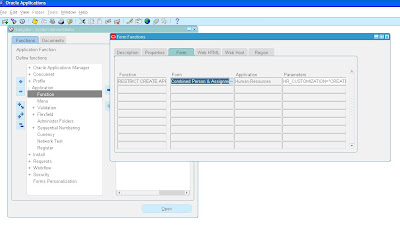
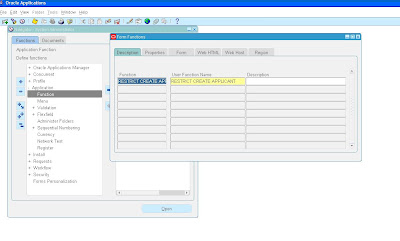
Responsibility: System AdministratorNavigation: Application > functionCreate a new form functionType: FormForm: Combined Person & Assignment FormParameters: HR_CUSTOMIZATION="xx_your_custom_form" in our case it will beHR_CUSTOMIZATION="CREATE ACTION"

3. Add this new function in your menuResponsibility: System Administrator
Navigation: Application > menuQuery the menu your responsibility is using and replace the existing function with the newly created custom function.
Please note that HR_CUSTOMIZATION parameter does not work in conjunction with WORKFLOW_NAME (Task Flow)parameter

Tuesday, July 1, 2008

Sending mails from PLSQL..UTL_SMTP

Hi All,
Recently we got a requirement for sending mail..on a business logic..we tried to set the mail system on alerts..but still not succesful due to some other reasons..which we are still figuring out..
In the mean time we tried to send mail functionality from PLSQL..This is one package we found out in asktom.oracle.com...use this one directly to compile ..and send mail...it works...

create or replace package XX_DOF_mail_pkg as
type array1 is table of varchar2(255);
procedure send( p_sender_email in varchar2,
p_from in varchar2,
p_to in array default array(),
p_cc in array default array(),
p_bcc in array default array(),
p_subject in varchar2,
p_body in long );
end;


create or replace package body mail_pkg as
g_crlf char(2) default chr(13)chr(10);
g_mail_conn utl_smtp.connection;
g_mailhost varchar2(255) := 'govmail1.gov.com;--Give your smtp mail address..check whether it exists in teh host file or not...
function address_email( p_string in varchar2,
p_recipients in array ) return varchar2 is
l_recipients long;
begin for i in 1 .. p_recipients.count loop
utl_smtp.rcpt(g_mail_conn, p_recipients(i) );
if ( l_recipients is null ) then
l_recipients := p_string p_recipients(i) ;
else
l_recipients := l_recipients ', ' p_recipients(i);
end if;
end loop;
return l_recipients;
end;
procedure send( p_sender_email in varchar2,
p_from in varchar2 ,
p_to in array default array(),
p_cc in array default array(),
p_bcc in array default array(),
p_subject in varchar2 ,
p_body in long ) is
l_to_list long;
l_cc_list long;
l_bcc_list long;
l_date varchar2(255) default to_char( SYSDATE, 'dd Mon yy hh24:mi:ss' );
procedure writeData( p_text in varchar2 ) as
begin
if ( p_text is not null ) then
utl_smtp.write_data( g_mail_conn, p_text g_crlf );
end if;
end;
begin
g_mail_conn := utl_smtp.open_connection(g_mailhost, 25);
utl_smtp.helo(g_mail_conn, g_mailhost);
utl_smtp.mail(g_mail_conn, p_sender_email);
l_to_list := address_email( 'To: ', p_to );
l_cc_list := address_email( 'Cc: ', p_cc );
l_bcc_list := address_email( 'Bcc: ', p_bcc );
utl_smtp.open_data(g_mail_conn );
writeData( 'Date: ' l_date );
writeData( 'From: ' nvl( p_from, p_sender_email ) );
writeData( 'Subject: ' nvl( p_subject, '(no subject)' ) );
writeData( l_to_list ); writeData( l_cc_list );
utl_smtp.write_data( g_mail_conn, '' g_crlf );
utl_smtp.write_data(g_mail_conn, p_body );
utl_smtp.close_data(g_mail_conn );
utl_smtp.quit(g_mail_conn); end;
end;
/*******************************************************/
use this script to test the error....
begin mail_pkg.send
( p_sender_email => 'murthyganjam@gmail.com',
p_from => 'Oracle Database Account <mailto:murthyganjam@gmail.com,
p_to => mail_pkg.array( 'murthyganjam@gmail.com', 'murthyganjam@gmail.com' ),
p_cc => mail_pkg.array( 'murthyganjam@gmail.com' ),
p_bcc => mail_pkg.array( 'murthyganjam@gmail.com' ),
p_subject => 'Testing mailing package',
p_body => 'Hello murthy, this is the mail you need' );
end;
in case you want to handle the exception block for this program use the following exception block in the package...


EXCEPTION
WHEN UTL_SMTP.INVALID_OPERATION THEN
dbms_output.put_line(' Invalid Operation in SMTP transaction.');
WHEN UTL_SMTP.TRANSIENT_ERROR THEN
dbms_output.put_line(' Temporary problems with sending email - try again later.');
WHEN UTL_SMTP.PERMANENT_ERROR THEN
dbms_output.put_line(' Errors in code for SMTP transaction.');

Saturday, June 28, 2008

All About SQL Loader-1

Hi all,
I am trying for some information on sqlloader on net..there is tonnes of information available..
out of all at one place i found this artice which covers most of the sqlloader queries...
"http://www.orafaq.com/wiki/SQL%2ALoader_FAQ"
I am putting this here for ready reference...next atricel i will try to cover doing it from oracel applications...

What is SQL*Loader and what is it used for?
SQL*Loader is a bulk loader utility used for moving data from external files into the Oracle database. Its syntax is similar to that of the DB2 load utility, but comes with more options. SQL*Loader supports various load formats, selective loading, and multi-table loads.

How does one use the SQL*Loader utility?
One can load data into an Oracle database by using the sqlldr (sqlload on some platforms) utility. Invoke the utility without arguments to get a list of available parameters. Look at the following example: sqlldr username@server/password control=loader.ctl
This sample control file (loader.ctl) will load an external data file containing delimited data: load data
infile 'c:\data\mydata.csv'
into table emp
fields terminated by "," optionally enclosed by '"'
( empno, empname, sal, deptno )
The mydata.csv file may look like this: 10001,"Scott Tiger", 1000, 40
10002,"Frank Naude", 500, 20
Another Sample control file with in-line data formatted as fix length records. The trick is to specify "*" as the name of the data file, and use BEGINDATA to start the data section in the control file: load data
infile *
replace
into table departments
( dept position (02:05) char(4),
deptname position (08:27) char(20)
)
begindata
COSC COMPUTER SCIENCE
ENGL ENGLISH LITERATURE
MATH MATHEMATICS
POLY POLITICAL SCIENCE

How does one load MS-Excel data into Oracle?
Open the MS-Excel spreadsheet and save it as a CSV (Comma Separated Values) file. This file can now be copied to the Oracle machine and loaded using the SQL*Loader utility.
Possible problems and workarounds:
The spreadsheet may contain cells with newline characters (ALT+ENTER). SQL*Loader expects the entire record to be on a single line. Run the following macro to remove newline characters (Tools -> Macro -> Visual Basic Editor): ' Removing tabs and carriage returns from worksheet cells
Sub CleanUp()
Dim TheCell As Range
On Error Resume Next
For Each TheCell In ActiveSheet.UsedRange
With TheCell
If .HasFormula = False Then
.Value = Application.WorksheetFunction.Clean(.Value)
End If
End With
Next TheCell
End Sub
Tools:
If you need a utility to load Excel data into Oracle, download quickload from sourceforge at http://sourceforge.net/projects/quickload

Is there a SQL*Unloader to download data to a flat file?
Oracle does not supply any data unload utilities. Here are some workarounds:
Using SQL*Plus
You can use SQL*Plus to select and format your data and then spool it to a file. This example spools out a CSV (common separated values) file that can be imported into MS-Excel: set echo off newpage 0 space 0 pagesize 0 feed off head off trimspool on
spool oradata.txt
select col1 ',' col2 ',' col3
from tab1
where col2 = 'XYZ';
spool off
You can also use the "set colsep ," command if you don't want to put the commas in by hand. This saves a lot of typing: set colsep ,
set echo off newpage 0 space 0 pagesize 0 feed off head off trimspool on
spool oradata.txt
select col1, col2, col3
from tab1
where col2 = 'XYZ';
spool off
Using PL/SQL
PL/SQL's UTL_FILE package can also be used to unload data. Example: declare
fp utl_file.file_type;
begin
fp := utl_file.fopen('c:\oradata','tab1.txt','w');
utl_file.putf(fp, '%s, %sn', 'TextField', 55);
utl_file.fclose(fp);
end;
/
Third-party programs
You might also want to investigate third party tools to help you unload data from Oracle. Here are some examples:
WisdomForce FastReader - http://www.wisdomforce.com
IxUnload from ixionsoftware.com - http://www.ixionsoftware.com/products/
FAst extraCT (FACT) for Oracle from CoSort - http://www.cosort.com/products/FACT
Unicenter (also ManageIT or Platinum) Fast Unload for Oracle from CA
Keeptool's Hora unload/load facility (part v5 to v6 upgrade) can export to formats cuch as as Microsoft Excel, DBF, XML, and text - http://www.keeptool.com/en/keeptool_hora.php
TOAD from Quest
SQLWays from Ispirer Systems
PL/SQL Developer from allroundautomation

Can one load variable and fix length data records?
Loading delimited (variable length) data
In the first example we will show how delimited (variable length) data can be loaded into Oracle: LOAD DATA
INFILE *
INTO TABLE load_delimited_data
FIELDS TERMINATED BY "," OPTIONALLY ENCLOSED BY '"'
TRAILING NULLCOLS
( data1,
data2
)
BEGINDATA
11111,AAAAAAAAAA
22222,"A,B,C,D,"
NOTE: The default data type in SQL*Loader is CHAR(255). To load character fields longer than 255 characters, code the type and length in your control file. By doing this, Oracle will allocate a big enough buffer to hold the entire column, thus eliminating potential "Field in data file exceeds maximum length" errors. Example: ...
resume char(4000),
...
Loading positional (fixed length) data
If you need to load positional data (fixed length), look at the following control file example: LOAD DATA
INFILE *
INTO TABLE load_positional_data
( data1 POSITION(1:5),
data2 POSITION(6:15)
)
BEGINDATA
11111AAAAAAAAAA
22222BBBBBBBBBB
For example, position(01:05) will give the 1st to the 5th character (11111 and 22222).

Can one skip header records while loading?
One can skip unwanted header records or continue an interrupted load (for example if you run out of space) by specifying the "SKIP=n" keyword. "n" specifies the number of logical rows to skip. Look at these examples: OPTIONS (SKIP=5)
LOAD DATA
INFILE *
INTO TABLE load_positional_data
( data1 POSITION(1:5),
data2 POSITION(6:15)
)
BEGINDATA
11111AAAAAAAAAA
22222BBBBBBBBBB
...
sqlldr userid=ora_id/ora_passwd control=control_file_name.ctl skip=4
If you are continuing a multiple table direct path load, you may need to use the CONTINUE_LOAD clause instead of the SKIP parameter. CONTINUE_LOAD allows you to specify a different number of rows to skip for each of the tables you are loading.

Can one modify data as the database gets loaded?
Data can be modified as it loads into the Oracle Database. One can also populate columns with static or derived values. However, this only applies for the conventional load path (and not for direct path loads). Here are some examples: LOAD DATA
INFILE *
INTO TABLE modified_data
( rec_no "my_db_sequence.nextval",
region CONSTANT '31',
time_loaded "to_char(SYSDATE, 'HH24:MI')",
data1 POSITION(1:5) ":data1/100",
data2 POSITION(6:15) "upper(:data2)",
data3 POSITION(16:22)"to_date(:data3, 'YYMMDD')"
)
BEGINDATA
11111AAAAAAAAAA991201
22222BBBBBBBBBB990112
LOAD DATA
INFILE 'mail_orders.txt'
BADFILE 'bad_orders.txt'
APPEND
INTO TABLE mailing_list
FIELDS TERMINATED BY ","
( addr,
city,
state,
zipcode,
mailing_addr "decode(:mailing_addr, null, :addr, :mailing_addr)",
mailing_city "decode(:mailing_city, null, :city, :mailing_city)",
mailing_state
)

Can one load data from multiple files/ into multiple tables at once?
Loading from multiple input files
One can load from multiple input files provided they use the same record format by repeating the INFILE clause. Here is an example: LOAD DATA
INFILE file1.dat
INFILE file2.dat
INFILE file3.dat
APPEND
INTO TABLE emp
( empno POSITION(1:4) INTEGER EXTERNAL,
ename POSITION(6:15) CHAR,
deptno POSITION(17:18) CHAR,
mgr POSITION(20:23) INTEGER EXTERNAL
)
Loading into multiple tables
One can also specify multiple "INTO TABLE" clauses in the SQL*Loader control file to load into multiple tables. Look at the following example: LOAD DATA
INFILE *
INTO TABLE tab1 WHEN tab = 'tab1'
( tab FILLER CHAR(4),
col1 INTEGER
)
INTO TABLE tab2 WHEN tab = 'tab2'
( tab FILLER POSITION(1:4),
col1 INTEGER
)
BEGINDATA
tab11
tab12
tab22
tab33
The "tab" field is marked as a FILLER as we don't want to load it.
Note the use of "POSITION" on the second routing value (tab = 'tab2'). By default field scanning doesn't start over from the beginning of the record for new INTO TABLE clauses. Instead, scanning continues where it left off. POSITION is needed to reset the pointer to the beginning of the record again.
Another example: LOAD DATA
INFILE 'mydata.dat'
REPLACE
INTO TABLE emp
WHEN empno != ' '
( empno POSITION(1:4) INTEGER EXTERNAL,
ename POSITION(6:15) CHAR,
deptno POSITION(17:18) CHAR,
mgr POSITION(20:23) INTEGER EXTERNAL
)
INTO TABLE proj
WHEN projno != ' '
( projno POSITION(25:27) INTEGER EXTERNAL,
empno POSITION(1:4) INTEGER EXTERNAL
)
Can one selectively load only the records that one need?
Look at this example, (01) is the first character, (30:37) are characters 30 to 37: LOAD DATA
INFILE 'mydata.dat' BADFILE 'mydata.bad' DISCARDFILE 'mydata.dis'
APPEND
INTO TABLE my_selective_table
WHEN (01) <> 'H' and (01) <> 'T' and (30:37) = '20031217'
(
region CONSTANT '31',
service_key POSITION(01:11) INTEGER EXTERNAL,
call_b_no POSITION(12:29) CHAR
)
NOTE: SQL*Loader does not allow the use of OR in the WHEN clause. You can only use AND as in the example above! To workaround this problem, code multiple "INTO TABLE ... WHEN" clauses. Here is an example: LOAD DATA
INFILE 'mydata.dat' BADFILE 'mydata.bad' DISCARDFILE 'mydata.dis'
APPEND
INTO TABLE my_selective_table
WHEN (01) <> 'H' and (01) <> 'T'
(
region CONSTANT '31',
service_key POSITION(01:11) INTEGER EXTERNAL,
call_b_no POSITION(12:29) CHAR
)
INTO TABLE my_selective_table
WHEN (30:37) = '20031217'
(
region CONSTANT '31',
service_key POSITION(01:11) INTEGER EXTERNAL,
call_b_no POSITION(12:29) CHAR
)

Can one skip certain columns while loading data?
One cannot use POSITION(x:y) with delimited data. Luckily, from Oracle 8i one can specify FILLER columns. FILLER columns are used to skip columns/fields in the load file, ignoring fields that one does not want. Look at this example: LOAD DATA
TRUNCATE INTO TABLE T1
FIELDS TERMINATED BY ','
( field1,
field2 FILLER,
field3
)

How does one load multi-line records?
One can create one logical record from multiple physical records using one of the following two clauses:
CONCATENATE - use when SQL*Loader should combine the same number of physical recordstogether to form one logical record.
CONTINUEIF - use if a condition indicates that multiple records should be treated as one. Eg. by having a '#' character in column 1.

How can one get SQL*Loader to COMMIT only at the end of the load file?
One cannot, but by setting the ROWS= parameter to a large value, committing can be reduced. Make sure you have big rollback segments ready when you use a high value for ROWS=.

Can one improve the performance of SQL*Loader?
A very simple but easily overlooked hint is not to have any indexes and/or constraints (primary key) on your load tables during the load process. This will significantly slow down load times even with ROWS= set to a high value.
Add the following option in the command line: DIRECT=TRUE. This will effectively bypass most of the RDBMS processing. However, there are cases when you can't use direct load. For details, refer to the FAQ about the differences between the conventional and direct path loader below.
Turn off database logging by specifying the UNRECOVERABLE option. This option can only be used with direct data loads.
Run multiple load jobs concurrently.

What is the difference between the conventional and direct path loader?
The conventional path loader essentially loads the data by using standard INSERT statements. The direct path loader (DIRECT=TRUE) bypasses much of the logic involved with that, and loads directly into the Oracle data files. More information about the restrictions of direct path loading can be obtained from the Oracle Server Utilities Guide (see chapter 8).
Some of the restrictions with direct path loads are:
Loaded data will not be replicated
Cannot always use SQL strings for column processing in the control file (something like this will probably fail: col1 date "ddmonyyyy" "substr(:period,1,9)"). Details are in Metalink Note:230120.1.
How does one use SQL*Loader to load images, sound clips and documents?
Any one has more information on this section please put forward ..
SQL*Loader can load data from a "primary data file", SDF (Secondary Data file - for loading nested tables and VARRAYs) or LOBFILE. The LOBFILE method provides an easy way to load documents, photos, images and audio clips into BLOB and CLOB columns. Look at this example:
Given the following table: CREATE TABLE image_table (
image_id NUMBER(5),
file_name VARCHAR2(30),
image_data BLOB);
Control File: LOAD DATA
INFILE *
INTO TABLE image_table
REPLACE
FIELDS TERMINATED BY ','
(
image_id INTEGER(5),
file_name CHAR(30),
image_data LOBFILE (file_name) TERMINATED BY EOF
)
BEGINDATA
001,image1.gif
002,image2.jpg
003,image3.jpg

How does one load EBCDIC data?
Specify the character set WE8EBCDIC500 for the EBCDIC data. The following example shows the SQL*Loader controlfile to load a fixed length EBCDIC record into the Oracle Database: LOAD DATA
CHARACTERSET WE8EBCDIC500
INFILE data.ebc "fix 86 buffers 1024"
BADFILE data.bad'
DISCARDFILE data.dsc'
REPLACE
INTO TABLE temp_data
(
field1 POSITION (1:4) INTEGER EXTERNAL,
field2 POSITION (5:6) INTEGER EXTERNAL,
field3 POSITION (7:12) INTEGER EXTERNAL,
field4 POSITION (13:42) CHAR,
field5 POSITION (43:72) CHAR,
field6 POSITION (73:73) INTEGER EXTERNAL,
field7 POSITION (74:74) INTEGER EXTERNAL,
field8 POSITION (75:75) INTEGER EXTERNAL,
field9 POSITION (76:86) INTEGER EXTERNAL
)

Monday, June 9, 2008

Query Find Form/ Find Block Form

1. Open APPSTAND form in your current form first
2. drag and drop QUERY_FIND object from APPSTAND as
COPY onto c01_CHN_REP form.
After It copies in three places.
1. then Delete QUERY_FIND object group from your C01_CHN_REP form.


Query Find
There are two implementations for Query Find. One implementation shows a Row–LOV that shows the available rows and allows you to choose one. The other implementation opens a Find window, which shows you the fields the user is likely to want to use for selecting data.
Use only one implementation for a given block. All queryable blocks within your form should support Query Find. The Oracle Applications User Interface Standards for Forms–Based Products describe what situations are better served by the two implementations.
Query Find Window
To implement a Find window, create an additional window that contains the fields a user is most likely to search by when they initiate the search and copy all the item values from that block into the results block just before executing a query.


Step 1: Copy the Query_find object group from APPSTAND, by opening APPSTAND form. Delete the object group from your form. ( after they are copied you do not need the Object group). Rename the appropriate objects

Step 2:
Rename the New Block, Canvas and Window just now created please !!
Rename the Find Block, Canvas, and Window.
Set the Queryable property of the block to No. ( query Allowed = N )


For this example, rename the block, canvas and window to
QF_BLK, QF_CANVAS and QF_W


Step3:
Edit the NEW Button’s Triggerin the QF_BLK provided button.
Edit the WHEN–BUTTON–PRESSED trigger for the NEW button in the Find window block so that it passes the Results block name as the argument. This information allows Oracle Applications to navigate to your block and place you on a new record. This button is included because when you first enter a form, the Find window may automatically come up; users who want to immediately start entering a new record can press this button. The code you will add is :

app_find.new('C01_CHN_REP_BLK');

Step 4:
Edit the FIND Button’s Trigger
Edit the WHEN–BUTTON–PRESSED trigger for the FIND button so that it passes the Results block name. This information allows Oracle Applications to navigate to your block and execute a query.
app_find.find(’’); becomes
:parameter.G_query_find := 'TRUE';
/* can place additional Validation code here */
fnd_message.set_string('Inside when-button-pressed:
Find');
fnd_message.show ;
app_find.find('C01_CHN_REP_BLK');
:parameter.G_query_find := 'FALSE';

If you need to do further validation of items in the Find window, place your code before the call to APP_FIND.FIND. Specifically, you should validate that any low/high range fields are correct.

Step 5:
Set Navigation Data Block Properties
Set the Previous Navigation Data Block property of the
QF_BLK (Find ) block to be
the results block ( C01_CHN_REP_BLK). This allows the user to leave the Find window
without executing a query.
From the results block, next and previous data block only move up and down the hierarchy of objects; they never take you to the Find window.

Step 6:
Edit the KEY–NXTBLK Trigger
Edit the KEY–NXTBLK trigger on the QF_BLK Find block so that it has the exact
same functionality as the FIND button.
If the user selects ”Go–>NextBlock,” the behavior should mimic pressing the FIND button.

:parameter.G_query_find := 'TRUE';
app_find.find('C01_CHN_REP_BLK');
:parameter.G_query_find := 'FALSE';

Step 7:
Change the Find Window Title
Change the title of the QF_W Find window.
The Channel example uses ”Find Channel Reps”.

Step 8:
Create Necessary Items
Create the items that the user can query on in the Find window block.
You may find it convenient to copy items from the Results block to the Find window block.
Follow these guidelines for items in the Find window:
??Set the Required property to No
??Set the default value to NULL
??If you copied the items from the Results block, ensure that your new items all have Database Item set to No, and remove all triggers associated with them (especially validation triggers). If for some reason you decide you need to keep a particular trigger,
remember to change the fields it references to point to the Find block.

??Typically, an item in the Find window block has an LOV associated with it, because users should usually be able to select exactly one valid value for the item. The LOV should show all values that have ever been valid, not just those values that are currently valid. Date fields may use the Calendar and the related KEY–LISTVAL trigger.
??If you have an item that has a displayed value and an associated ID field, the Find window block should have both as well. The ID field should be used to drive the query to improve performance.

Step 9
Fit the Find Window to Your Form
Adjust your Find window for your specific case: resize the window,
position, fields, and so on.( very dangerous fear WATSON !! )
Create a PRE–QUERY Trigger
Create a block–level Pre–Query trigger in the Results block CHN_REP_BLK (Execution Hierarchy: Before)
that copies query criteria from the Find window block to the Results block (where the query actually occurs).

You can use the Oracle Forms COPY built–in to copy character data.
For other data types, you can assign the values directly using :=, but this method does not allow the user to use wildcards. However, most of your Find window items use LOVs to provide a unique value, so wildcards would not be necessary.

IF :parameter.G_query_find = ’TRUE’ THEN
COPY (,’’);
:parameter.G_query_find := ’FALSE’;
END IF;

Example for our form in PRE-QUERY trigger on CHN_REP_BLK
if :parameter.G_query_find = 'TRUE'
then
copy (:qf_blk.qf_chn_rep_code,
'C01_CHN_REP_BLK.CHN_REP_CODE') ;
copy (:qf_blk.qf_NAME, 'C01_CHN_REP_BLK.NAME') ;

:parameter.G_query_find := 'FALSE';
end if ;
Step 11
Create a QUERY_FIND Trigger
Create a block–level user–named trigger ”QUERY_FIND”
(Execution Hierarchy: Override) on the CHN_REP_BLK Results block
that contains:

APP_FIND.QUERY_FIND(’’,
’,
’);

/* Result Window, Query window, Query Blk */
app_find.query_find('C01_CHN_REPS_W',
'QF_W',
'QF_BLK' ) ;

Step 12:

Raising Query Find on Form Startup
Note: If you want a Row–LOV or
Find window to raise immediately upon entering the form, at the end of your WHEN–NEW–FORM–INSTANCE trigger, call:
EXECUTE_TRIGGER(’QUERY_FIND’);

This will simulate the user invoking the function while in the first block of the form.
Also Save version c01_chn_rep_V8.fmb


Implementing Row–LOV

To implement a Row–LOV, create an LOV that selects the primary key of the row the user wants into a form parameter, and then copy that value into the primary key field in the results block right before executing a query.

This example uses the DEPT block, which is based on the DEPT table, and consists of the three columns DEPTNO, DNAME and LOC. This table contains a row for each department in a company.


Step 1: Create a Parameter for Your Primary Key

Create a form parameter(s) to hold the primary key(s) for the LOV. If the Row–LOV is for a detail block, you do not need a parameter for the foreign key to the master block (the join column(s)), as you should include that column in the WHERE clause of your record group in a later step. Set the data type and length appropriately.

For example, for the DEPT block, create a parameter called DEPTNO_QF.


Step 2: Create an LOV
Create an LOV that includes the columns your user needs to identify the desired row. If the Row–LOV is for a detail block, you should include the foreign key to the master block (the join column(s)) in the WHERE clause of your record group. Return the primary key for the row into the parameter.

For our example, create an LOV, DEPT_QF that contains the columns DEPTNO and DNAME. Set the return item for DEPTNO into parameter DEPTNO_QF. Although the user sees DNAME, it is not returned into any field.

Step 3: Create a PRE–QUERY Trigger

Create a block–level PRE–QUERY trigger (Execution Hierarchy: Before) that contains:

IF: PARAMETER.G_QUERY_FIND = ’TRUE’ THEN
:= :parameter.;
: PARAMETER.G_QUERY_FIND := ’FALSE’;
END IF;

For the Dept example, your PRE–QUERY trigger contains:

IF :parameter.G_query_find = ’TRUE’ THEN
: DEPT.DEPTNO := :parameter.DEPTNO_QF
:parameter.G_query_find := ’FALSE’;
END IF;


Step 4: Create a QUERY_FIND Trigger

Finally, create a block–level user–named trigger QUERY_FIND on the results block (Execution Hierarchy: Override) that contains:

APP_FIND.QUERY_FIND (’’);

For DEPT:
APP_FIND.QUERY_FIND (’DEPT_QF’);

Monday, April 28, 2008

Attachment Functionality in Oracle Applications

why do i need a attachment functionality?
The attachments feature enables users to link unstructured data, such as images, wordprocessing documents, spreadsheets, or text to their application data. For example,users can link images to items or video to operations as operation instructions.
Can i enable it to any form i want?
For most of the standar you can do that..i hope custom form done in standard way can also have this feauture enabled
where should i start???
Lets Define the terms first
1.Entity:An entity is an object within Oracle Applications data, such as an item, an order, or anorder line. The attachments feature must be enabled for an entity before users can link attachments to the entity.
2.Category:A document category is a label that users apply to individual attachments anddocuments. Document categories provide security by restricting the documents that canbe viewed or added via a specific form or form function.
In the below example i am tryign to enable the attachment funcionality for the USer form..I want to upload the approval copy for creating a user or attaching new responsibility
what are the steps to do that??
Step1:First Define a Entity for which you are creating the attachments.In my case it is users.
define the base table and entityid and others things


Step2:Define a category(optional).if the attachments belongs logically to different group.
In this example i am addding to the miscellenous category.

Make the assignments of the Function once you define it.
step3:Find the Form Name,Function Name and block name to which the attachment feauture need to be enabled.
Step4:Define the Attachment Function .Seelct the type either you want the attachmetn feature at form level or Function level


Press the Blocks Button. and Enter the Block name you want to enable the attachment feauture.

Press the Entities Button

Enter the entity and other settings and see what fuctionalties are required for this form.like query,insert,update and delete allowed can be done or not from this form
Enter the primary Key so that it show the document based on the primary key.

If it a common document like across users then primary key should not be given.

Press the categories button to select the caegories

Press the Assignments Button in document categories and attach the Function.

Now the attache button is enabled..press the button and upload the document..


uploading document is self explainable
for developing some complex one..read tthe application developer for more info..
more or less it depends on the entity definition and the primary key for the document..
you can have more than one primary key...just play aroud with the primary key..you will be able to get any requirement...

Sunday, April 27, 2008

How to Make a Form Query only?

Hi all,
This is one of the common requirement.They are many ways of doing this like formpersonalization ,Cutom.plland others ..the easiest way to do it is by passing the parameter QUERY_ONLY=YES..
But it doesn't gurantee all the forms will behave as expected because the form should be coded to make it work for this..not all standard forms have this..
In HRMS Forms case there is another concept called task flow by which we can make the form read only..(i will provide a article on this at some other time)..
Steps:
1.Check the form which need ot be made as query only.
2.Go to the menu to which it is attached and the get the user function name of the form
3.query the function from application developer(resp)-->application-->function

4.query the function you have to modify
5.Create a new function logically same as the old one (attach the same form)
6.Go to Form tab in the functions window.

7.Enter QUERY_ONLY="YES" in the parameters window
8.Attach the new view only function to the required menu..
Using Form Personalization:

My requrirement is to not all the users to add new responsibilities or new user with responsibilities..it is only allowed for certain people..lets see this sceniro implementation throught form personalization
1.Go to the form which needs to be personalized
2.Open the personalization screen

3.create a rule at when new form instance level


make update,delete,insert allowed property to false to the block you want to remove the funcionaltiy
4.save the record..
if you want to give access to only one user sysadmin
create one rule to remove access by making delete ,insert and update allowed false..
Create another rule at new form instance level , context-> user and sysadmin and then make insert ,delete,update allowed true..
These two rules will make that only sysadmin to attach new responsibilities..

Thursday, April 24, 2008

Special Validation type Valuesets

How do you validate the parameter value of a concurrent program submitted through SRS window?

This is one of the recent requirement i come across..after some research i came to know it can be done using special valueset.

1.create a valueset of specail validation type

2.create a validate Event.you can write the PLSQL COde to validate

FND PLSQL "declare
l_email VARCHAR2(2000) := :!VALUE;
BEGIN
IF NVL(UPPER(substr(l_email,-9,9)),'INVALID')<>'GMAIL.COM' THEN
fnd_message.set_name('FND','INVALID_EMAIL');
fnd_message.raise_error;
end if;
end;"

3.attach it to the parameter in ..you will get a warning while saving the program ..ignore it..


As far i checked it is validation only when you enter...

THis is another sample available in one of the forums..but didn't work for me..

FND PLSQL "declare
l_payroll VARCHAR2(20) := ':$FLEX$.VALSET_TST5';
l_input DATE := :!VALUE;
BEGIN
if l_payroll is null and l_input is not null then
fnd_message.set_name('XXPAY','ONLY_ENTER_DATE_WITH_PAYROLL');
fnd_message.raise_error;
end if;
end;"

Jus try to experiment around..this might meet your requirement....